
So my blog is back up, Had issues with the server hosting it but its now fixed :)
So my blog is back up, Had issues with the server hosting it but its now fixed :)
Securing Apache can be different if you have custom modules running, for this quick note/tutorial I am going to assume that it is a fresh install of Apache or a lamp stack (sudo apt-get install lamp-server^)…
bash in… (sudo bash)
as root:
I am sure you can do a lot more to “secure” your apache installation, but this is a good start, it will hide your server information from port scanners and scripts trying to detect what your server version is. This makes it much harder to exploit your box, it’s hard to exploit something you have no idea what its running.
You can also make your default directory your home directory if you wish to encrypt your files. If you want more security I would consider tools to encrypt the entire partition/drive, you can find out more about full disk encryption for uOS Server 12.04 here.
Getting a 610 error response from Google lately? Perhaps you have a bad API key? Not really it actually might be because Google deprecated support for their API V2…
Want to learn how to make a responsive google map for your site using PHP & HTML5 on API 3? here is how…
Note: In API V3 you do not require or use an api key.
Objectives:
Create a quick solution to produce responsive HTML5 Google Maps on the fly.
First we will begin with a quick HTML wrapper and to place our iframe in…
[cc lang=”html”]
[/cc]
Use CSS to control the iframe and wrapper, this will also keep iframe in widescreen/16:9
[cc lang=”css”]
.wrapper
{
height: 0;
padding-bottom: 56.25%; /* 16: 9 */
position: relative;
width: 100%;
margin: 0;
overflow: hidden;
}
iframe
{
height: 100%;
left: 0;
position: absolute;
top: 0;
width: 100%;
border: 0;
overflow: hidden;
}
[/cc]
Now lets create the function that will generate a iframe tag on the fly by simply passing 1 value… an address
[cc lang=”php”]
# google map iframe generation
function gMap($a)
{
// setting up vars
$lat = ”;
$lon = ”;
$addr = $a;
$addr = urlencode($addr);
$u=”http://maps.googleapis.com/maps/api/geocode/json?address=”.$addr.”&sensor=false”; // URL
$ch = curl_init();
curl_setopt($ch, CURLOPT_URL, $u);
curl_setopt($ch, CURLOPT_HEADER,0);
curl_setopt($ch, CURLOPT_USERAGENT, $_SERVER[“HTTP_USER_AGENT”]);
// Comment out the line below if you receive an error on certain hosts that have security restrictions
curl_setopt($ch, CURLOPT_FOLLOWLOCATION, 1);
curl_setopt($ch, CURLOPT_RETURNTRANSFER, 1);
$d = curl_exec($ch);
curl_close($ch);
$g = json_decode($d, true);
// Debugging Purposes… or if you wanna use additional data…
//echo ‘
';
//print_r($g);
//echo '
‘;
// If the Json request was successful…
if ($g)
{
$lat = $g[‘results’][0][‘geometry’][‘location’][‘lat’];
$lon = $g[‘results’][0][‘geometry’][‘location’][‘lng’];
$m = ‘‘;
echo $m;
} else {
echo ”
No Map Available
“;
}
}
[/cc]
Our php then goes inside the div
[cc lang=”php”]
< ?php // you can insert a var instead of string if you wish ex: gMap($address) gMap('48034 Rancho Way Temecula CA, 92592'); ?>
[/cc]
An example of a running script
[cc lang=”php”]
< ?php
# google map iframe generation
function gMap($a)
{
// setting up vars
$lat = '';
$lon = '';
$addr = $a;
$addr = urlencode($addr);
$u="http://maps.googleapis.com/maps/api/geocode/json?address=".$addr."&sensor=false"; // URL
$ch = curl_init();
curl_setopt($ch, CURLOPT_URL, $u);
curl_setopt($ch, CURLOPT_HEADER,0);
curl_setopt($ch, CURLOPT_USERAGENT, $_SERVER["HTTP_USER_AGENT"]);
// Comment out the line below if you receive an error on certain hosts that have security restrictions
curl_setopt($ch, CURLOPT_FOLLOWLOCATION, 1);
curl_setopt($ch, CURLOPT_RETURNTRANSFER, 1);
$d = curl_exec($ch);
curl_close($ch);
$g = json_decode($d, true);
// Debugging Purposes... or if you wanna use additional data...
//echo '
‘;
//print_r($g);
//echo
;
// If the Json request was successful…if ($g)
{
$lat = $g[‘results’][0][‘geometry’][‘location’][‘lat’];
$lon = $g[‘results’][0][‘geometry’][‘location’][‘lng’];
$m = ‘‘;
echo $m;
} else {
echo ”No Map Available
“;
}
}?>
< ?php // you can insert a var instead of string if you wish ex: gMap($address) gMap('48034 Rancho Way Temecula CA, 92592'); ?>[/cc]
Let me know if you have any questions. :)

Like usual all the Google Fanboys, marketing buffs are in full effect as Google and their millions of dollars begin to influence the masses with what they call revolutionary… Google Glass.
As usual all the sheeple are blinded by the fad and how their social status will be after wearing these glasses. What people are failing to see are the numerous privacy issues that these type of devices bring to the table, if you think hacked cellphones are a problem lets dive into some of the possibilities with Google Glass…
Camera Hi-Jacking
This Could be used on a compromised device to take snapshots of meetings, projects, monitors/screens and so on. Now days cameras on smart devices tend to embed GPS information into pictures, which can result as another tracking vector.
Microphone Hacking/Hijacking
This Could be used to snoop in on private meetings, talks, calls and things along these lines.
Video Interception
One of my favorites, If pulled off correctly this could allow a potential attacker/agency the ability to record/view multiple locations at a single time. This could also be used in conjunction with facial recognition, it would allow multiple glasses to work as spy cams, which are a lot closer to people (when worn) ultimately creating a more effective facial recognition system/surveillance grid. This could also be used to spy on peoples workplace, their meetings, life or anything that could be exploited/copied/stolen by eavesdropping.
GPS Tacking We all know how that works, but what most people don’t know is that this has actually been secretly done for YEARS using cell phones as part of another NSA program. This would just be another vector used.
Does every still believe that Google is just out for your best interest? I mean it’s no coincidence that an ex-NSA director just happened to get hired by Google. If you know anything about computer science or information technology, you know that NOTHING IS UN HACK-ABLE and that no corporation is out for your best interest…

It’s true Bitcoin is and has been steadily growing in use increasing its user base more than 1400% in one year. This because “it is immune to government or bank manipulation” -Max Keiser.
If true this has become the semi-perfect solution to traditional monetary policy as crypto-currency is not governed by any central authority.
This is a very interesting concept and hopefully we will know more in the coming months. As Bitcoin currency cannot be manipulated it may soon become a widely used global currency possibly overtaking traditional currency notes and even the current global reserve currency, The US Dollar.
Max Keiser talks about bitcoin:
http://rt.com/shows/keiser-report/episode-416-max-keiser-005/
http://www.youtube.com/watch?v=sMcZF4810ao
This post is important because phpmyadmin no longer just works after apt-get install, it requires additional steps to get working.
Aside from these changes, due to recent reports on phpmyadmin being exploited it’s important to secure it, you can do this in a couple of ways but I am going to assume you want access to it via web.
2 Parts
Lets begin the install muahahaha…
Enter root mode:
sudo bash
Install:
apt-get install phpmyadmin
Open Apache Config File
vim /etc/apache2/apache2.conf
Insert the following line at the very bottom of apache2.conf
Include /etc/phpmyadmin/apache.conf
Restart Apache server:
service apache2 restart
Securing phpmyadmin from public access to web panel…
Edit phpmyadmin’s apache configuration file:
vim /etc/phpmyadmin/apache.conf
Under the directory section (<Directory /usr/share/phpmyadmin>), add the line “AllowOverride All” under “Directory Index”:
        <Directory /usr/share/phpmyadmin>
        Options FollowSymLinks
        DirectoryIndex index.php
        AllowOverride All
create .htaccess file in phpmyadmin’s root directory:
vim /usr/share/phpmyadmin/.htaccessCopy the following into the newly created .htaccess file:
AuthType Basic
AuthName "Restricted Files"
AuthUserFile /var/.htpasswd (make sure you set this path to a secure place outside your web root)
Require valid-user
Generate the password file where passwords will be stored for authentication/access to phpmyadmin root
htpasswd -c /var/.htpasswd username (username should be your username, you will be asked for your password once you execute the command)
Restart Apache so updates can take effect:
service apache2 restart
If you want this to be more secure then I would suggest rethinking your server/network architecture…
If you have any questions or comments use the section below :)
A REAL setup guide for NIC bonding in Ubuntu Server 12.04/12.04.2 because everyone online sucks at actually posting the correct information, probably due to the current explosion of online “experts” plagiarizing other “experts” online…
This was tested on a HP DL380 with Dual Broadcom NICS.
enter root mode:
sudo bash
then install the bonding drivers:
apt-get install ifenslave-2.6
edit /etc/network/interfaces
vim /etc/network/interfaces
You can pretty much copy the following into interfaces after line 5 # The loopback network interface
################################################
auto lo
iface lo inet loopback

auto eth0
iface eth0 inet dhcp
 bond-master bond0

auto eth1
iface eth1 inet dhcp
 bond-master bond0

auto bond0
iface bond0 inet static
 address 192.168.1.xxx  <----------( Enter Your Actual Server IP )
 netmask 255.255.255.0  <----------( Enter Your Actual Subnet )
 gateway 192.168.1.1     <----------( Enter Your Actual router/gateway IP )
 bond-slaves none
 bond-miimon 100
 bond-mode balance-rr ( Driver Mode )
################################################
edit /etc/modules
vim /etc/modules
and add bonding under rtc value
loop
lp
rtc
bonding
reboot your box or restart network services, Thats pretty much it… questions or comments? Use the comment functionality :)
So I figured I would write a post about this because I could not find any information regarding this type of error except lots of confusion on multiple forums, hopefully this post will shed some light on the error and will help you fix yours :)
If you are developing HTML 5 Apps for mobile devices and are using jQuery you are most likely going to run in a few errors which you’re going to have to debug. In this case I am going to talk about an error inside Full Screen mode (App mode) for the iPhone which takes you to an “undefined URL” error page when clicking on a link…
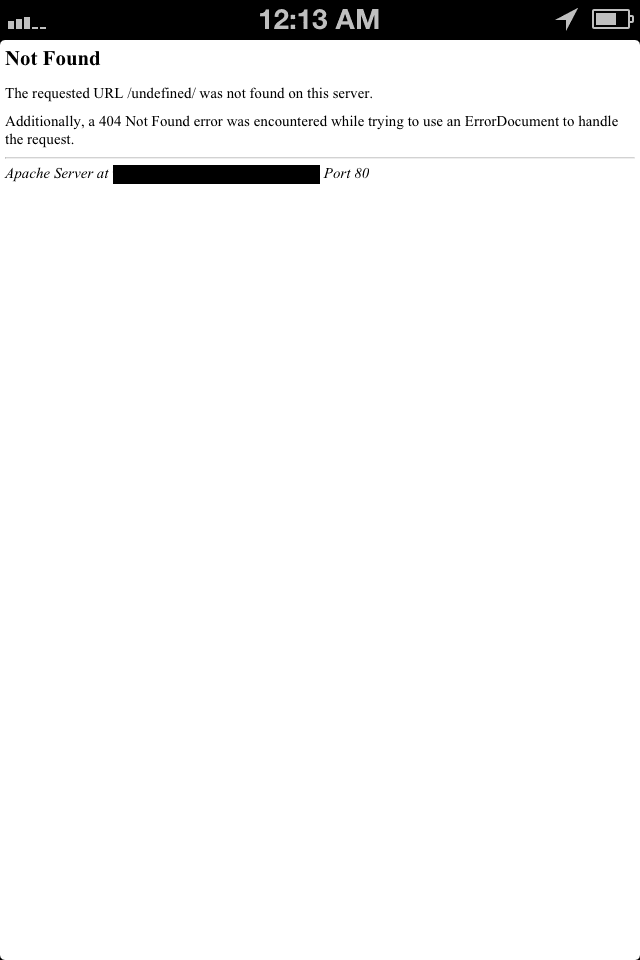
When using using <a href> links in APP mode you have 2 issues:
If you’re having problems like the first error description (closing app mode and opening safari when clicking page links) you are going to want to use some jquery to handle the loading of the link internally, this can be done with the following line of code:
[cc lang=jquery]
$( document ).on(“click”, “a”, function( event ){
event.preventDefault(); location.href = $( event.target ).attr( “href” );
});
[/cc]
But what if you are using <a> links without a “href” attribute as triggers for slide effects in jquery? This will give you an “underfined URL” error page. In my case it was due the code above, because jQuery was looking for an href attribute that was not present inside the <a> element and was not able to “define” a valid URL. To fix this I rewrote my script in order to first check if the <a> element had a “href” attribute, if it did then proceed with the internal loading, If not then prevent the default behavior of the <a> element, after all I was simply using an “<a>” (<a class=””></a>) element as a trigger to slide in and out a sub menu. To fix this and control both “href” and non href links use the following code:
[cc lang=jquery]
$( document ).on(“click”, “a”, function( event ){
if($( event.target ).attr( “href” ))
{
event.preventDefault(); location.href = $( event.target ).attr( “href” );
}
else
{
event.preventDefault();
}
});
[/cc]
This will allow you to use <a> elements as triggers and regular internal links without sending you to an undefined URL error page. Anyways I hope this helps :)
If you need further assistance use the comment functionality on this post.
Regards,
Ok so I decided to quickly make this post because it was such a bitch to figure this out, all the information regarding missing dynamic libraries are in many cases unclear and could not find anything specific on the mcrypt library.
if you get the:
“PHP Startup: Unable to load dynamic library ‘/usr/lib/php5/20090626/mcrypt.so’ – libmcrypt.so.4: cannot open shared object file: No such file or directory in Unknown on line 0”
Here is whats going on…
you are missing files that are part of Apaches/PHP’s resources or you php.ini has the “entension_dir” value duplicated/actively pointing to the wrong location or php-cli is using the wrong php.ini config file. In my case it was due to a glitch with Ubuntu servers live OS update to 12.04.1 LTS which removed the old libraries and never re-installed them as part of the update.
Here is the checklist that will save you a long-ass headache, one that I unfortunately went through…
1) check your php.ini and make sure your “extension_dir” value (typically between line 805-809) is nulled out so its not processed (usually has a ; in front of it) in some cases the php.ini can be in multiple locations for apache/php-cli etc…
2) your mcrypt.so library is missing or corrupt.
first lets remove any possible installations of mcrypt libraries by running this in a shell, if you don’t have it installed skip this step (or you can still do it and if its not installed it will do nothing)…
sudo apt-get remove php5-mcrypt
sudo apt-get purge php5-mcrypt
then run this in a shell…
apt-get install php5-mcrypt (or you can sudo reboot too ;))
/etc/init.d/apache2 restart
once this is done you should no longer get this error. If you have any issues please leave me a comment below :)
So I made this post due the twitters infamous changes that screwed up my last script that pulled your last tweet via atom protocol…
Anyways I can’t take full credit for the script since part of it I got from Bradley Spencer, I simply added the formatting functionality after the tweet extraction which he did not provide on his blog ;)
[cc lang=”php”]
// set user name
$username=’websymantecs’;
// set format
$format=’json’;
//get tweets and decode them into a variable
$tweet=json_decode(file_get_contents(“http://api.twitter.com/1/statuses/user_timeline/{$username}.{$format}”));
//now lets take this variable/string and manipulate it to display it formatted correctly…
$link = strstr($tweet[0]->text, “http”);
$text = substr($tweet[0]->text, 0, strpos($tweet[0]->text, “http”));
echo $text . ‘‘.$link.’‘;
[/cc]